
Activity, assets, and ROI for field ambassador programs
See the work ambassadors completed, the evidence they submitted, the costs tied to each activation, and the leads your team can follow up with.
Connect each field action to a useful record
CampusThreads keeps activity details close to the people, places, costs, and outcomes involved. Managers can review a program from the campaign level or open the record behind a number.
Proof of work
Ambassadors submit photos, notes, hours, expenses, leads, and answers to the questions required for the assignment.
Attributed leads
Give each ambassador or activation a trackable link or QR code, then keep the lead source attached for follow-up.
Spend by campaign
Approved hours, reimbursements, rewards, space costs, and physical items can be read beside the work that created the cost.
Asset history
Track where products, signs, samples, equipment, and merchandise were stored, carried, used, returned, or redeemed.
Read the program from the dashboard or the source record
Managers can start with a program view, then open reports and inventory records when a result needs context.
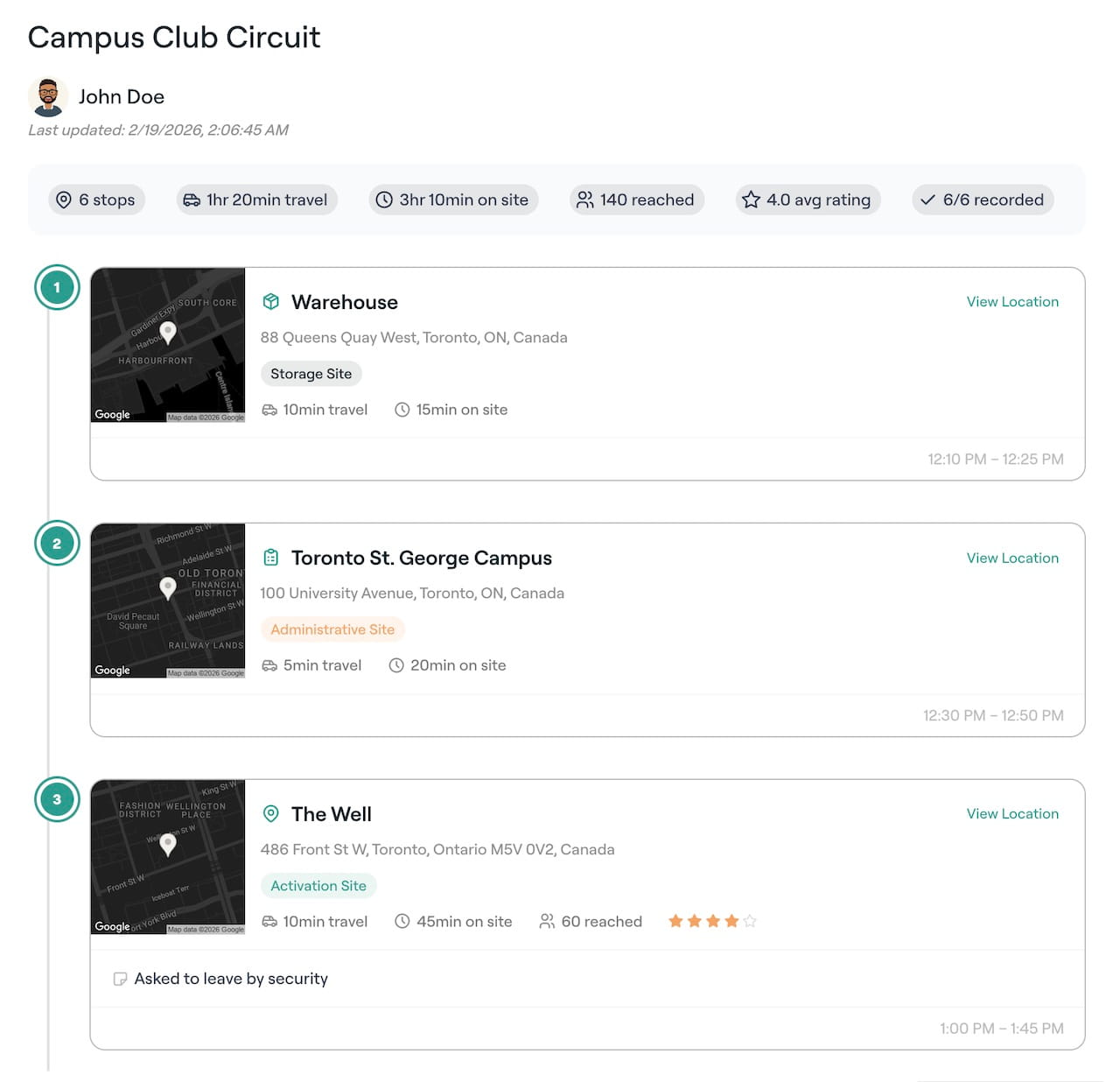
Multi-stop activation records
Review stops, travel time, time on site, reported reach, ambassador notes, ratings, and completion from the route record.
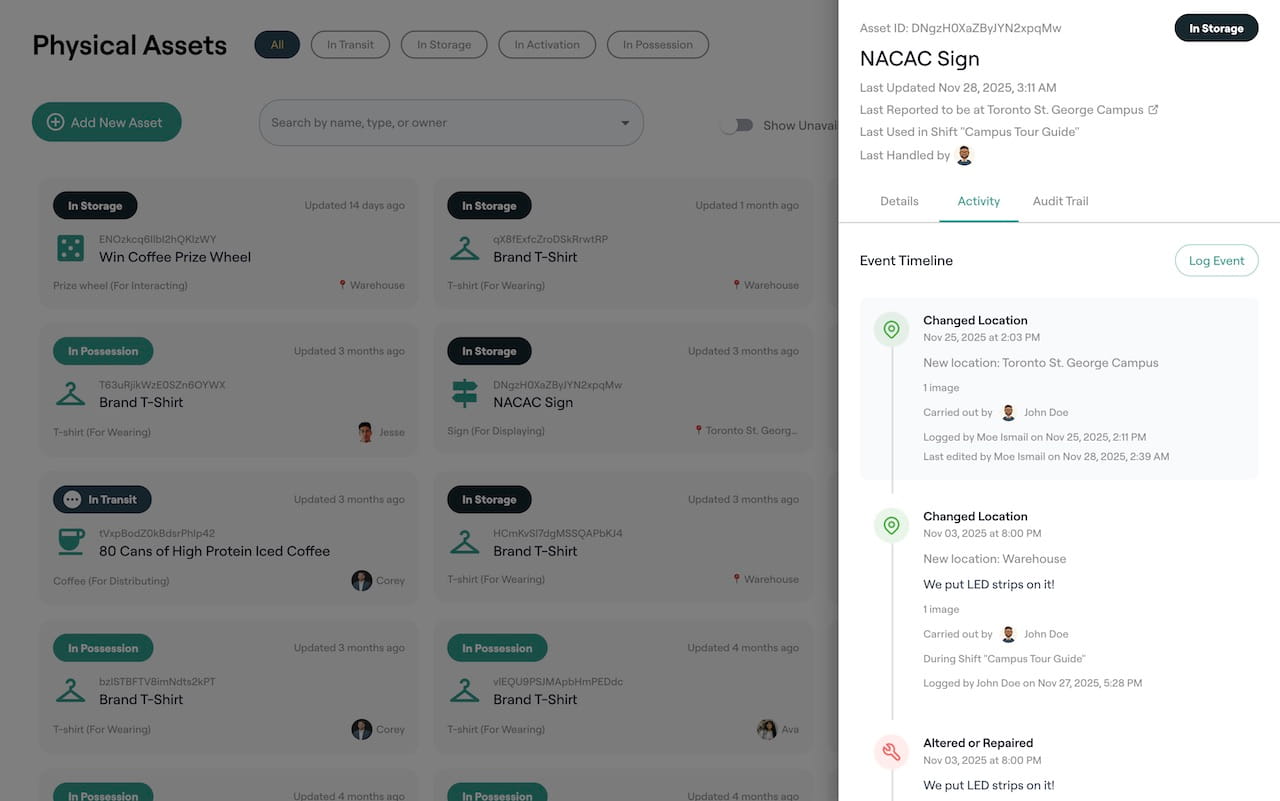
Physical asset records
See an item’s current state, last location, handler, repair notes, activation use, and audit history.
A field report moves through four clear stages
The assignment defines what the ambassador should submit. Review stays tied to that brief and the resulting record.
Set the requirements
Choose the evidence, questions, expected hours, lead fields, expenses, and assets for the activity.
Collect the field record
The ambassador submits the report from a phone or browser after completing the work.
Review the evidence
A manager checks the submission, requests details, records approval, and confirms payable time or expenses.
Read the result
Approved activity appears in reporting with its ambassador, campaign, location, spend, leads, and asset use.
Ask the AI colleague about the records behind a result
The optional AI colleague can find reports that need review, point out missing evidence, prepare a follow-up, and answer questions using approved program data. Manager approval stays in place for actions involving money, people, or messages sent outside the workspace.
Questions a manager can ask
Useful for programs built around in-person work
The same record structure works across local activations, tours, competitions, retail events, field visits, and community programs.
Product sampling
Record inventory issued, locations covered, photos submitted, samples distributed, lead capture, hours, and expenses.
Student club events
Connect the host, ambassador team, event brief, attendance notes, referrals, follow-up, and program cost.
Regional field teams
Compare local activity while keeping the report behind each total available for review.
Merchandise and equipment
Follow items from storage through an activation and back, with handoffs recorded in the asset timeline.
Activity and ROI questions
What can CampusThreads measure for a brand ambassador program?
CampusThreads records shifts, tasks, field reports, approved hours, expenses, rewards, asset use, referrals, attributed leads, and campaign results. The exact fields depend on the requirements your team sets.
How does lead attribution work?
A team can use trackable links or QR codes for an ambassador, campaign, or activation. Lead records keep the original source so managers can report on follow-up and outcomes.
Can field reports require photos or other evidence?
Yes. A manager can define the evidence and questions required for a shift or task. Submitted reports stay attached to the assignment and review history.
Can CampusThreads connect to a CRM?
CampusThreads supports integration workflows including Salesforce and Zapier. CRM access can be offered as a paid add-on for a brand workspace.
See a working field program and its records
Open the simulated sandbox to inspect reports, assets, budgets, rewards, and attributed results. A brand workspace is free for up to 35 ambassadors.
Includes 1 GB of storage and follows fair-use limits.